

Tags
Tags let you label prompts with custom categories so you can break down visibility and citation data along the dimensions that matter to you, like funnel stage, product line, audience, or use case. Any prompt can have multiple tags, and every tag becomes a filter across the rest of Gauge.Creating Tags
Tags are simple labels you define yourself. You can create them directly on the Prompts page, or ask Ask Gauge to create them for you.Applying Tags to Prompts
A prompt can carry several tags at once. A single prompt might be tagged “City Commuter” and “Family Buyer” if it touches both. You can apply tags manually on the Prompts page, or have Ask Gauge apply them in bulk.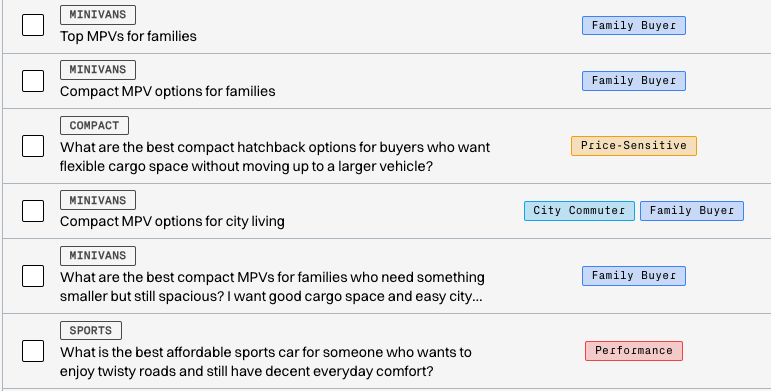
Prompts with tags applied
Slicing Visibility and Citations by Tag
Once your prompts are tagged, you can filter the Rankings and Citations pages by tag. This lets you take a precise view of the data for any slice you care about, for example your bottom-of-funnel prompts only, or your enterprise prompts only. Tag filters combine with the existing topic and LLM filters, so you can stack them to narrow down further. Use “Match any” to see prompts with at least one of the selected tags, or “Match all” to see only prompts that carry every selected tag.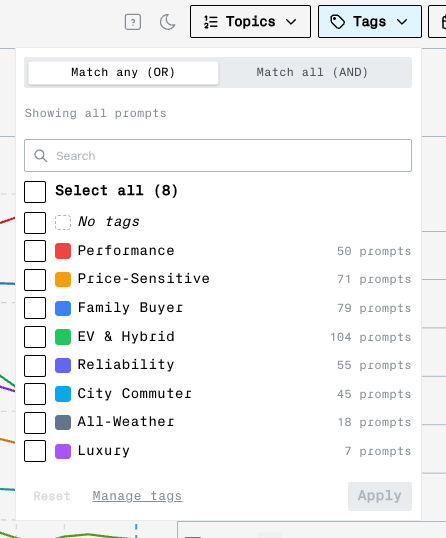
Filtering the Rankings page by tag