> ## Documentation Index
> Fetch the complete documentation index at: https://docs.withgauge.com/llms.txt
> Use this file to discover all available pages before exploring further.
# Sentiment Analysis
> Understand how AI models talk about your brand, not just how often you appear, but what they actually say.
## AI Sentiment Analysis
Sentiment Analysis looks at the answer text from every prompt Gauge runs across the platform — both non-branded prompts like "What's the best AI SEO company?" and branded prompts like "How does Gauge help companies rank better in AI search?" Rather than just tracking whether your brand appears, Gauge analyzes the actual language AI models use to describe you.
## What It Measures
Sentiment Analysis goes beyond a simple positive/negative score. Gauge looks across your entire dataset — every prompt, every model, every response — and surfaces:
* **Sentiment over time** — how the tone of AI responses about your brand is trending
* **Sentiment distribution** — the breakdown of positive, negative, and neutral tone
* **Model-level breakdown** — how different LLMs (ChatGPT, Gemini, etc.) talk about your brand differently
* **Key themes and quotes** — specific language patterns and direct quotes pulled from model responses
## How It Works
Gauge uses full-text search across all responses collected on the platform to group recurring themes into an easy-to-read dashboard. This isn't a single prompt run once, or even the same prompt run a hundred times. It's a view across your entire data set — every prompt Gauge runs, across every model — so the findings reflect how AI consistently positions your brand, not just a snapshot.
## What You'll Find
### Strengths and Key Findings
The dashboard surfaces what AI models consistently say your brand does well. For example, if models repeatedly describe your product as data-driven or highlight a specific feature positively, those themes are grouped and shown with supporting quotes directly from the models.
### Weaknesses and Gaps
Sentiment Analysis also highlights where your positioning may need work. If models are mischaracterizing your pricing, undervaluing a feature, or comparing you unfavorably to competitors, you'll see that here — with the exact quotes to back it up. These insights are actionable: they point to areas where updating your content or messaging could shift how AI talks about you.
### Competitive Positioning
See how AI frames your brand relative to competitors across the full response dataset.
## Availability
AI Sentiment Analysis is available for all Gauge customers. Two views are enabled by default: **Strengths & Weaknesses** and **Competitive Positioning**.
## Add Additional Themes for Sentiment
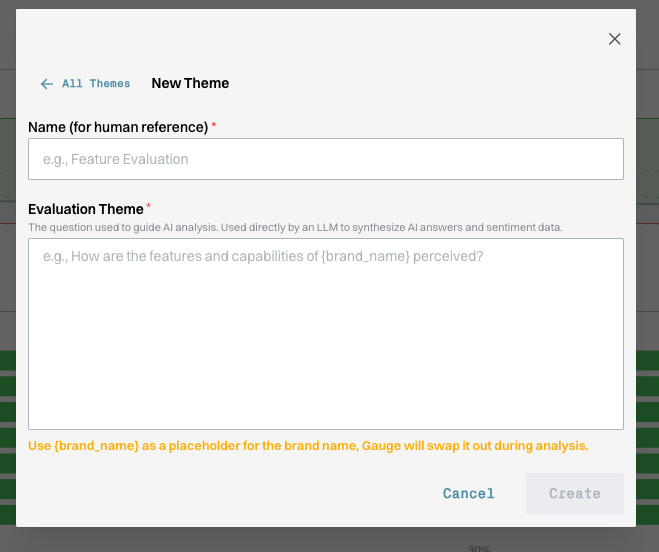
If you want Gauge to track a specific aspect of how AI describes your brand (pricing, a particular feature, positioning against a named competitor), you can add your own theme. Give it a name for your reference and write the evaluation question the LLM should use when synthesizing responses. Use `{brand_name}` as a placeholder and Gauge will swap it in during analysis.
Reddit