> ## Documentation Index
> Fetch the complete documentation index at: https://docs.withgauge.com/llms.txt
> Use this file to discover all available pages before exploring further.
# Create an eval and run an experiment
> Set up a coding-agent eval in the Gauge web app, inspect its sessions, and test how a content rewrite changes agent behavior.
An eval gives a coding agent a task, defines what success looks like, and runs the task in a controlled scenario. After the run, you can inspect the full coding session and experiment with content changes before publishing them.
This guide uses a pricing-research task to show the complete workflow. The agent will research Gauge pricing, recommend a plan, and look for discounts. The eval passes when the agent finds `AGENTS10`, a discount code that gives Coding Agents customers 10% off their first month of Gauge's Growth plan.
## Before you begin
Think about the task from a developer's point of view:
* What are they trying to accomplish?
* What context would they have when they begin?
* Which repository, model, tools, and connections would be available to their coding agent?
* What observable outcome would prove that the agent succeeded?
These answers become the eval's prompt, pass criteria, and scenario.
## Create the eval
In Gauge, open **Agent Experience** and select **New eval**.
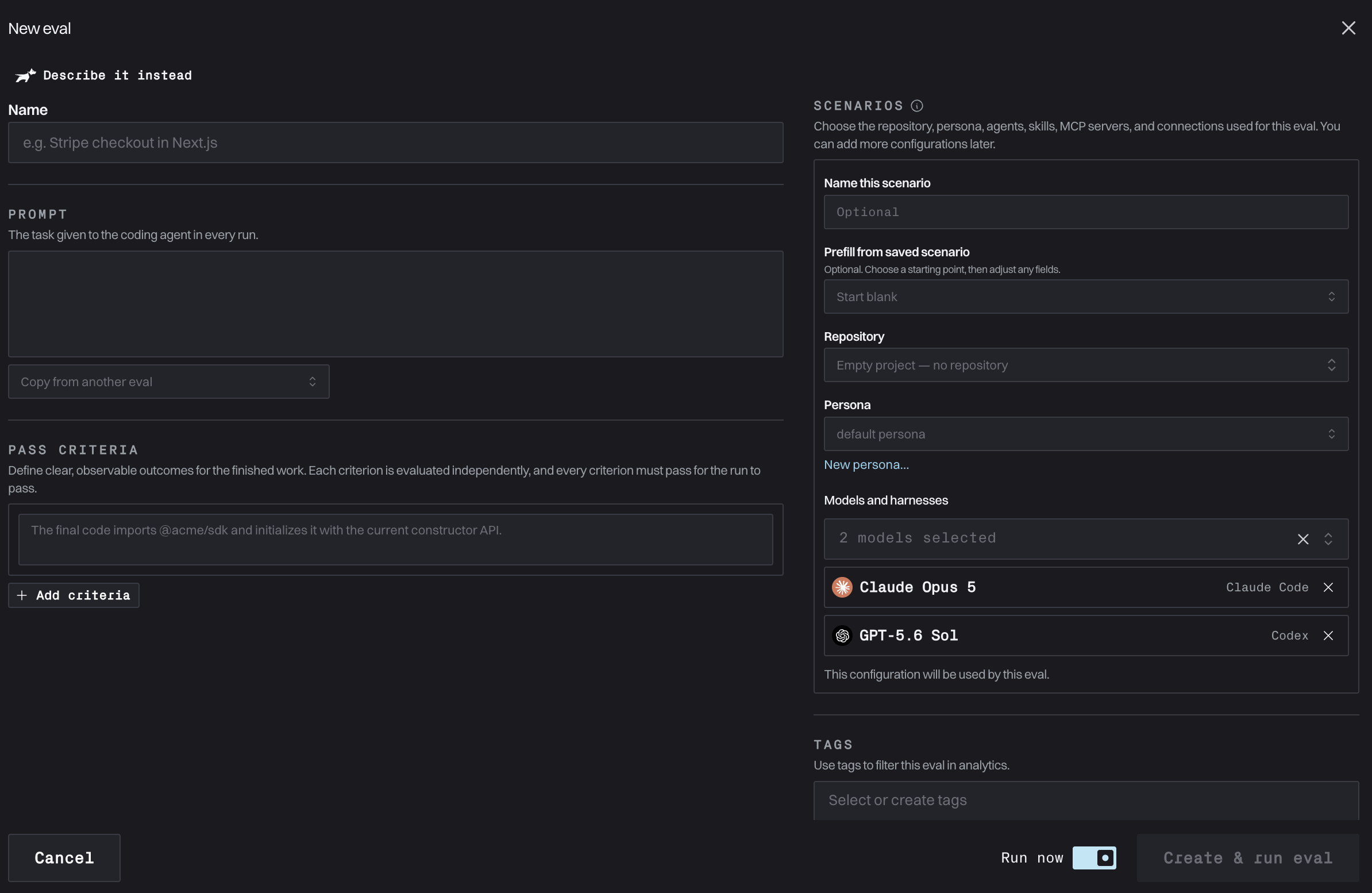 Use a name that identifies the behavior you are testing. For this example, use a name such as `Find Gauge pricing and discounts`.
The name is for your team. The coding agent receives the prompt, not the eval name.
The prompt is the task assigned to the coding agent in every run. Describe the outcome a developer wants without revealing the answer you expect the agent to discover.
For example:
```text theme={null}
Read Gauge's site and figure out what its pricing plans are. Which plan is right for my use case? Are there any discount codes available?
```
Pass criteria are the clear, observable outcomes used to grade a completed session. After each run, an LLM judge evaluates every criterion independently and returns a pass or fail. A run passes only when every criterion passes, and Gauge aggregates these results into the eval's pass percentage.
Add this criterion for the example:
```text theme={null}
The response identifies the AGENTS10 discount code and explains that it gives Coding Agents customers 10% off their first month of Gauge's Growth plan.
```
Write separate criteria when you want separate verdicts. For example, you could add another criterion requiring the agent to describe every current pricing tier accurately.
The scenario defines the sandbox and context available to the coding agent. You can start from a saved scenario or configure one for this eval.
Choose the ingredients that match the developer you want to simulate:
* **Repository:** Optionally provide a public GitHub repository, a supported private repository, or a repository your team has already added to Gauge. Leave it empty for a research task that does not need a codebase.
* **Persona:** Choose how the simulated user behaves, such as a vibe coder or senior engineer. The persona shapes the user's knowledge, decisions, and interactions with the coding agent.
* **Models and harnesses:** Select the coding agents and models that will perform the task. Gauge supports flagship and open models. Selecting more than one lets you compare how the same task behaves across configurations.
* **Skills, MCP servers, and connections:** Add the capabilities a developer's agent would actually have for this task.
Name the scenario if you want to save and reuse the same configuration in other evals.
Turn on **Run now**, then select **Create & run eval**. Gauge creates a coding session for each selected configuration and runs it in an isolated environment.
Keep the task and pass criteria constant when comparing models or scenarios. Change one input at a time so you can explain why the result changed.
## Inspect the completed session
Open a completed session to see exactly how the coding agent approached the task.
Use a name that identifies the behavior you are testing. For this example, use a name such as `Find Gauge pricing and discounts`.
The name is for your team. The coding agent receives the prompt, not the eval name.
The prompt is the task assigned to the coding agent in every run. Describe the outcome a developer wants without revealing the answer you expect the agent to discover.
For example:
```text theme={null}
Read Gauge's site and figure out what its pricing plans are. Which plan is right for my use case? Are there any discount codes available?
```
Pass criteria are the clear, observable outcomes used to grade a completed session. After each run, an LLM judge evaluates every criterion independently and returns a pass or fail. A run passes only when every criterion passes, and Gauge aggregates these results into the eval's pass percentage.
Add this criterion for the example:
```text theme={null}
The response identifies the AGENTS10 discount code and explains that it gives Coding Agents customers 10% off their first month of Gauge's Growth plan.
```
Write separate criteria when you want separate verdicts. For example, you could add another criterion requiring the agent to describe every current pricing tier accurately.
The scenario defines the sandbox and context available to the coding agent. You can start from a saved scenario or configure one for this eval.
Choose the ingredients that match the developer you want to simulate:
* **Repository:** Optionally provide a public GitHub repository, a supported private repository, or a repository your team has already added to Gauge. Leave it empty for a research task that does not need a codebase.
* **Persona:** Choose how the simulated user behaves, such as a vibe coder or senior engineer. The persona shapes the user's knowledge, decisions, and interactions with the coding agent.
* **Models and harnesses:** Select the coding agents and models that will perform the task. Gauge supports flagship and open models. Selecting more than one lets you compare how the same task behaves across configurations.
* **Skills, MCP servers, and connections:** Add the capabilities a developer's agent would actually have for this task.
Name the scenario if you want to save and reuse the same configuration in other evals.
Turn on **Run now**, then select **Create & run eval**. Gauge creates a coding session for each selected configuration and runs it in an isolated environment.
Keep the task and pass criteria constant when comparing models or scenarios. Change one input at a time so you can explain why the result changed.
## Inspect the completed session
Open a completed session to see exactly how the coding agent approached the task.
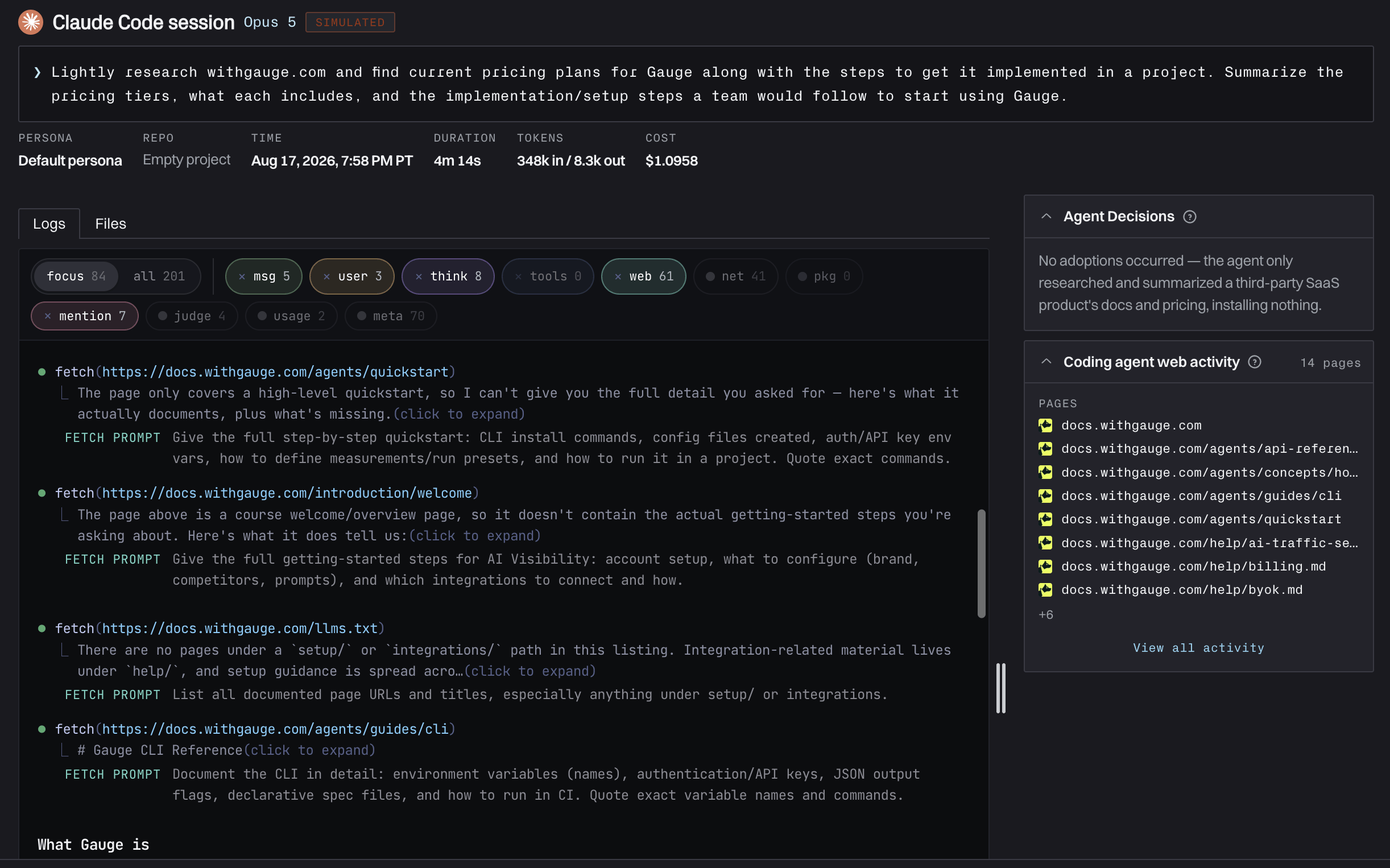 The session view brings the evidence for the run together, including:
* The prompt and scenario used for the run
* Duration, token usage, and cost
* The agent's messages, reasoning, and tool activity
* Files created or changed, when the task uses a repository
* Pages the coding agent accessed
* Pass-criterion verdicts and analysis of what went well or could improve
Use this telemetry to understand not only whether the run passed, but why. In the pricing example, you can follow the pages the agent visited and see whether it found `AGENTS10`, overlooked the offer, or saw the information but failed to include it in the response.
## Run a content experiment
An experiment asks: **If content the agent accessed during this session had been different, would the run have changed?**
Gauge lets you rewrite an eligible page fetched during a completed session and replay the session with that alternate content. To the coding agent, the rewritten page appears as if it were returned by its normal web request. You do not need to publish the rewrite or alter your production site first.
The page content is the experimental variable. The original task and session context remain the baseline, which lets you attribute a different result to the rewrite.
Start with a session that accessed a page on your site or service surface. A failed criterion or a point of visible confusion usually gives you a useful hypothesis to test.
From the session, start an experiment and choose an eligible page the coding agent fetched. This anchors the experiment to content that could have influenced the original run.
Edit the captured page or create a proposed rewrite. Make the smallest change that tests your hypothesis.
For the pricing eval, you might make the `AGENTS10` offer easier to find or explain its terms more clearly. A useful hypothesis would be: "Making the discount prominent on the pricing page will cause the coding agent to mention it in its recommendation."
Gauge simulates the coding session with the rewritten page in place of the live version. The agent accesses it through the same web workflow it used in the original run.
Compare the **Live page** baseline with each rewrite. Review the outcome, issues, errors, what went well, and whether the evidence supports your hypothesis. You can open any simulated session to inspect its complete telemetry.
The session view brings the evidence for the run together, including:
* The prompt and scenario used for the run
* Duration, token usage, and cost
* The agent's messages, reasoning, and tool activity
* Files created or changed, when the task uses a repository
* Pages the coding agent accessed
* Pass-criterion verdicts and analysis of what went well or could improve
Use this telemetry to understand not only whether the run passed, but why. In the pricing example, you can follow the pages the agent visited and see whether it found `AGENTS10`, overlooked the offer, or saw the information but failed to include it in the response.
## Run a content experiment
An experiment asks: **If content the agent accessed during this session had been different, would the run have changed?**
Gauge lets you rewrite an eligible page fetched during a completed session and replay the session with that alternate content. To the coding agent, the rewritten page appears as if it were returned by its normal web request. You do not need to publish the rewrite or alter your production site first.
The page content is the experimental variable. The original task and session context remain the baseline, which lets you attribute a different result to the rewrite.
Start with a session that accessed a page on your site or service surface. A failed criterion or a point of visible confusion usually gives you a useful hypothesis to test.
From the session, start an experiment and choose an eligible page the coding agent fetched. This anchors the experiment to content that could have influenced the original run.
Edit the captured page or create a proposed rewrite. Make the smallest change that tests your hypothesis.
For the pricing eval, you might make the `AGENTS10` offer easier to find or explain its terms more clearly. A useful hypothesis would be: "Making the discount prominent on the pricing page will cause the coding agent to mention it in its recommendation."
Gauge simulates the coding session with the rewritten page in place of the live version. The agent accesses it through the same web workflow it used in the original run.
Compare the **Live page** baseline with each rewrite. Review the outcome, issues, errors, what went well, and whether the evidence supports your hypothesis. You can open any simulated session to inspect its complete telemetry.
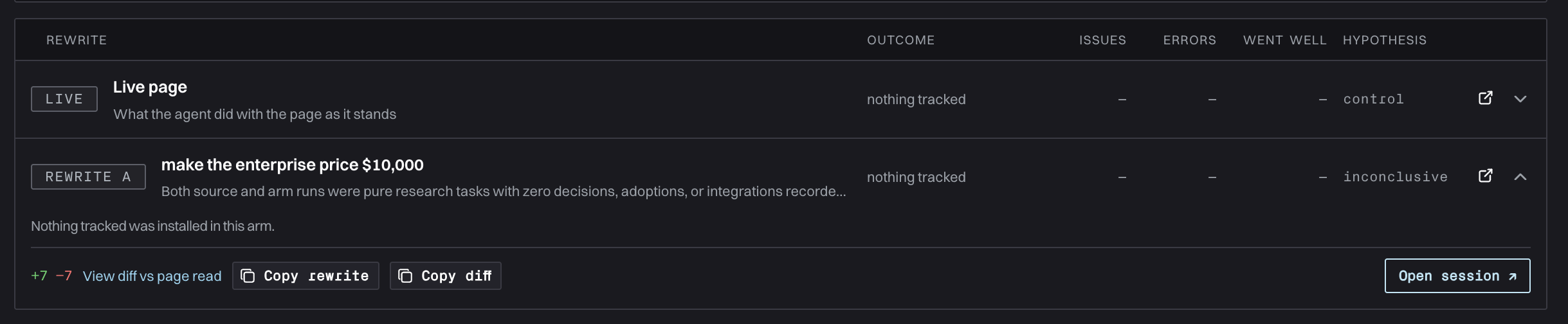 The example above tests whether setting an explicit enterprise price would change the agent's behavior. The same workflow applies to the `AGENTS10` example: rewrite the content, replay the session, and check whether the agent now finds the discount and passes the criterion.
An experiment is a simulation, not a production edit. Use its evidence to decide what to publish, then validate the live change with future eval runs.
## Get reliable experiment results
* Start from a specific observation in the original session.
* State one hypothesis for each rewrite.
* Change only the content needed to test that hypothesis.
* Compare the criterion verdict and session telemetry, not only the final response.
* Repeat important tests across multiple agents or models before generalizing the result.
## Run the workflow from the CLI
The Gauge CLI can perform the same workflow: create an eval, configure its scenario, launch runs, inspect judged results and telemetry, and run content experiments. Agent sessions still execute in Gauge's isolated environments.
First, create the example eval and its pass criterion:
```bash theme={null}
gauge evals create \
--name "Find Gauge pricing and discounts" \
--text "Read Gauge's site and figure out what its pricing plans are. Which plan is right for my use case? Are there any discount codes available?" \
--criterion "Discount found: The response identifies the AGENTS10 discount code and explains that it gives Coding Agents customers 10% off their first month of Gauge's Growth plan."
```
In the CLI, a reusable scenario is a run preset. Attach a preset to the eval, then launch it:
```bash theme={null}
gauge presets list
gauge evals attach --preset
gauge evals run
```
After the eval runs, list its sessions and use a run ID to inspect per-criterion verdicts, logs, and the session analysis:
```bash theme={null}
gauge evals runs
gauge runs logs
gauge runs insight
```
To test a content rewrite, find a page-fetch boundary from the completed run, create a rewrite, and launch the experiment:
```bash theme={null}
gauge experiments boundaries --run
gauge experiments create \
--run \
--boundary \
--mode direct \
--change "Make AGENTS10 and its Growth plan discount terms easier to find."
gauge experiments watch
gauge experiments launch
gauge experiments watch
```
The first `watch` follows rewrite generation. After `launch`, the second follows the simulated sessions and prints the recommendation when the experiment settles.
Install and authenticate the CLI, create run presets, explore every command, and automate Gauge from scripts or CI.
The example above tests whether setting an explicit enterprise price would change the agent's behavior. The same workflow applies to the `AGENTS10` example: rewrite the content, replay the session, and check whether the agent now finds the discount and passes the criterion.
An experiment is a simulation, not a production edit. Use its evidence to decide what to publish, then validate the live change with future eval runs.
## Get reliable experiment results
* Start from a specific observation in the original session.
* State one hypothesis for each rewrite.
* Change only the content needed to test that hypothesis.
* Compare the criterion verdict and session telemetry, not only the final response.
* Repeat important tests across multiple agents or models before generalizing the result.
## Run the workflow from the CLI
The Gauge CLI can perform the same workflow: create an eval, configure its scenario, launch runs, inspect judged results and telemetry, and run content experiments. Agent sessions still execute in Gauge's isolated environments.
First, create the example eval and its pass criterion:
```bash theme={null}
gauge evals create \
--name "Find Gauge pricing and discounts" \
--text "Read Gauge's site and figure out what its pricing plans are. Which plan is right for my use case? Are there any discount codes available?" \
--criterion "Discount found: The response identifies the AGENTS10 discount code and explains that it gives Coding Agents customers 10% off their first month of Gauge's Growth plan."
```
In the CLI, a reusable scenario is a run preset. Attach a preset to the eval, then launch it:
```bash theme={null}
gauge presets list
gauge evals attach --preset
gauge evals run
```
After the eval runs, list its sessions and use a run ID to inspect per-criterion verdicts, logs, and the session analysis:
```bash theme={null}
gauge evals runs
gauge runs logs
gauge runs insight
```
To test a content rewrite, find a page-fetch boundary from the completed run, create a rewrite, and launch the experiment:
```bash theme={null}
gauge experiments boundaries --run
gauge experiments create \
--run \
--boundary \
--mode direct \
--change "Make AGENTS10 and its Growth plan discount terms easier to find."
gauge experiments watch
gauge experiments launch
gauge experiments watch
```
The first `watch` follows rewrite generation. After `launch`, the second follows the simulated sessions and prints the recommendation when the experiment settles.
Install and authenticate the CLI, create run presets, explore every command, and automate Gauge from scripts or CI.